Class Page
Intro to Image Production (otherwise known as Photoshop) is a class offered here in RBR that teaches students how to use photoshop, compose unique images, and make websites like the one you're on right now.

Aside from this website, this was our first project in IP7. It is an image collage about me. In the PDF above me, you can see why I chose the images I did.

This is my full logo. In the future, you may see this featured near the corners of any new projects.

This is my abbreviated logo. Like the previous one, you may see this featured near the corners of any new projects in the future. You will probably see this one a lot more than the other one!

This is my animal jump out. It features a bird on a branch that seems to be jumping out of a forest background.

This is my person jump out. It features a man jumping and a sunset-themed background which can be seen in the box.

This is the cloning project. For this, our class was tasked to take photos of classmates with digital cameras. We then "cloned" our classmates into five different characters and made them interact with each other.

This is one of our two panoramic projects. This one is the different spot, same view panoramic. For this, we simply photographed the same spot, but moved either straight left or straight right to make it a panoramic.

This is our second panoramic project. For this, we had to capture the photos in the same spot, but a different view. This project involved us turning while rapidly taking photos to create the panoramic.

This is a close-up project. For this project, there were two parts: create a photo with a medium object involved, and then create one with a small object. This one is the medium object. We were tasked to take different photos and unify them so it looks as if a whole image was just taken.

This is the second part of our close-up project. For this, we had to use a small object.

This is our holiday card project. For this, we were able to create cards and choose them to be themed around any holiday!

This is the second part of several in our mirror unit. For this, we were tasked to take a photo of someone and mirror their body instead of their face. This is also Arely.

This is the first part of several in our mirror unit. For this, we were tasked to take a photo of someone and mirror their face. This is my friend Arely. She is a junior.

This is the third part of several in our mirror unit. For this, we were tasked to take a photo of something of our choice. However, it had to be artistic + colorful.

This is the fourth part of several in our mirror unit. For this, we had a choice of what we wanted to do. I did one of my classmate's shirts.

This is the final part of several in our mirror unit. For this, we were tasked to do a scenic spot of the school and mirror it.

This is a project we were tasked to complete while we were virtual because of an emergency in the school. We created a collage composed of items around our house.

This is a project where we had to take photos of an item that began with every letter of the alphabet. Then, we created a grid of all the projects.

This is our Depth to Field project. It is one of four. For this, we were tasked to take an image of two things that are related, explain why, and take one photo of one item for the background and another photo with the first item in the background of it.

This is our second Depth to Field project. It features a water bottle and its cap.

This is our third Depth to Field project. It features a computer and a mouse.

This is our fourth and final Depth to Field project. It features a digital camera and its SD card.

This is our series of Perspective Projects. For this, we were tasked to take a photo of an object at an interesting angle, and then place it in front of a corresponding background and explain why we did it.

This is our second project for Perspective. I used two laptops and a metal background.

This is our third project for Perspective. I used a cabinet and a wooden background.

This is our fourth project for Perspective. I used an SD card reader against a camera background.

This is our fifth project for Perspective. I used my friend Bren against the background of a cat.

This is our sixth and final project for Perspective. I used a USB port and a computer chip background.

This is our series of Forced Perspective projects. For this first one, I used Mr. Grillo and my hand.

This is our second Forced Perspective project. For this, I used a pen and a flag.
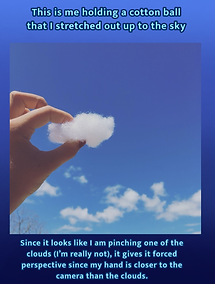
This is our third Forced Perspective project. For this, I used a cotton ball and my hand.

This is our fourth Forced Perspective project. For this, I used my hand to "hold" the guitar.

This is our fifth Forced Perspective project. For this, my friend jumped above a trash can to make it look like she actually was coming out of it.

This is the first project of our Reflection project series. For this, we were tasked to take various photos of reflections with our phones. We took full reflection photos (like this one), or photos of just the reflection on the phone screen.

This is our sixth and final Forced Perspective project. For this, I held a straw above a drink to make it look like it was bigger and actually coming out of the drink.

This is the second project of our Reflection project series.

This is the third project of our Reflection project series.

This is the fourth project of our Reflection project series.

This is the fifth project of our Reflection project series.

This is the sixth and final project of our Reflection project series.

This is the first of sixteen photos in our Contrast project. This is also the first conceptual contrast photo. Conceptual contrast is an "idea vs. an idea." This photo features a pair of flats next to a regular asphalt ground. These two contrast since flats are usually seen as elegant shoes for more elegant settings. However, they are on top of a normal, every-day road. This difference makes them contrast.

This is texture contrast. Texture contrast is when two different textures are touching or are very close to each other in one photo, which highlights their overall contrast. This photo features a rough sidewalk against smooth, light dirt. The difference in textures is what makes these both contrast. Dirt is usually not rough. It's more coarse, while sidewalks are more rough and bumpy.

This is another conceptual contrast photo. This photo features wet floor signs on top of completely dry ground. These two contrast because the wet floor signs state that the ground is wet, despite it actually being dry. It is like "dry vs. wet." They are the opposite.

This is another photo of texture contrast. In this photo, the smooth, cold top part of the hammer is against the firm, wooden handle. The top of the hammer is made from metal, while the handle is made from wood. The difference in material and texture is what makes the contrast up. The wood is not as shiny and cold as the metal.

This is another photo of texture contrast. In this photo, the smooth surface of a car can be seen next to the rough bark of a tree. These are two very different textures in one photo, making them contrast.

This is another conceptual contrast photo. This photo features my brother's desk being clean, while his bed and floor are messy. These two concepts contrast because clean and messy are the complete opposite of each other.

This is another conceptual contrast photo. This photo features my old iPhone. This iPhone, as can be seen, is very old. The screen is cracked and it even has a home button still. However, it still manages to turn on. When something is this old, it's common for it to not even work. But it does. The age of this iPhone and the fact that it still works are two contrasting concepts since, again, usually things that are this old do not work well or work at all.
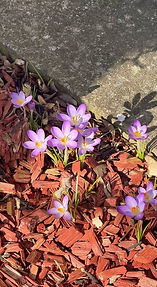
This is color contrast. Color contrast is when two opposite or striking color combinations are paired with each other. Although the colors in this photo are not opposite, they pair in a nice opposition with each other. This gives them contrast. The purple of the flowers against the rich color of the wood chips and dullness of the pavement makes contrast.

This is another photo of texture contrast. In this photo, I moved several blankets from my couch on the wooden floor. The softness of the blankets contrast with the cold, hard wooden floors. It's like "fuzzy vs. hard." The blankets are comfortable and soft, while the floor is, again, cold and hard. These two textures contrast.

This is another conceptual contrast photo. This photo features new flowers growing through the cracks of a sidewalk. This shows how new things can always happen even if the process is difficult or has "cracks" in it. The flowers represent newness while the cracks in the sidewalk represent adversity. These two concepts contrast, which makes it conceptual contrast.

This is another photo of color contrast. In this photo, there is a blue bottle of Gatorade on top of a pink blanket. Although blue and pink are not direct color opposites, they are still very different. The blue next to the pink is striking since they are two different colors, which gives it color contrast.

This is tonal contrast. Tonal contrast is basically "light vs. dark." This photo features a very bright TV in a completely dark room. This is tonal contrast since the brightness of the TV and darkness of the room are polar opposites. It's like "light. vs. dark." That creates contrast.

This is another photo of tonal contrast. This photo features one of the hallways in my friends house. This was taken at night, so most of the lights weren't on. This is tonal contrast because the lights that are on shine through the cracks in the door. That makes tiny slithers of light cast on the floor and walls. This difference gives it tonal contrast since it is, once again, "light vs. dark."

This is another photo of tonal contrast. This photo features a bright streetlight in the night sky. Although it is similar to the TV one, this one takes place outside and features more color in the background (the blue in the night sky). This is tonal contrast because the light from the streetlight contrasts with the dark from the night sky.

This is another photo of color contrast. In this photo, there is a yellow school bus against a bright blue sky. Although blue and orange are the actual true color contrasts, yellow is close to orange. The yellow and blue are almost on the opposite sides of the color wheel, which makes them almost contrasting colors. They are very different, which gives them color contrast overall.
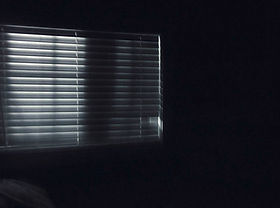
This is another photo of tonal contrast. This photo features a bright window in a dark room. However, it is different from the TV and streetlight photos because the blinds break up the light in numerous segments. Because of this, the light is not just in one big section. Instead, there are "pillars" of light which give the photo more variation and uniqueness against the dark surroundings.

This is another photo of color contrast. This photo features my friend's shoes against the grass. Her shoes are red while the grass is green. Red and green happen to be perfect contrasting colors, and since they are directly against each other in this photo, it is an example of color contrast.